Drop in a capture. Get a plain-English diagnosis.
Slow DNS, connections that never answer, a host beaconing to a server it shouldn't - PCAPNG Analyzer finds them in your pcapng and pcap files and shows you the evidence to prove it. It runs entirely on your own server: your captures never leave it.
No card or license key required. Upgrade only if you need Pro features.
New in version 2.0
Version 2 turns PCAPNG Analyzer from a capture viewer into a diagnosis tool. Existing installs upgrade with a normal image pull: the database migrates itself, and your history, notes and settings carry over.
A diagnosis, not just statistics
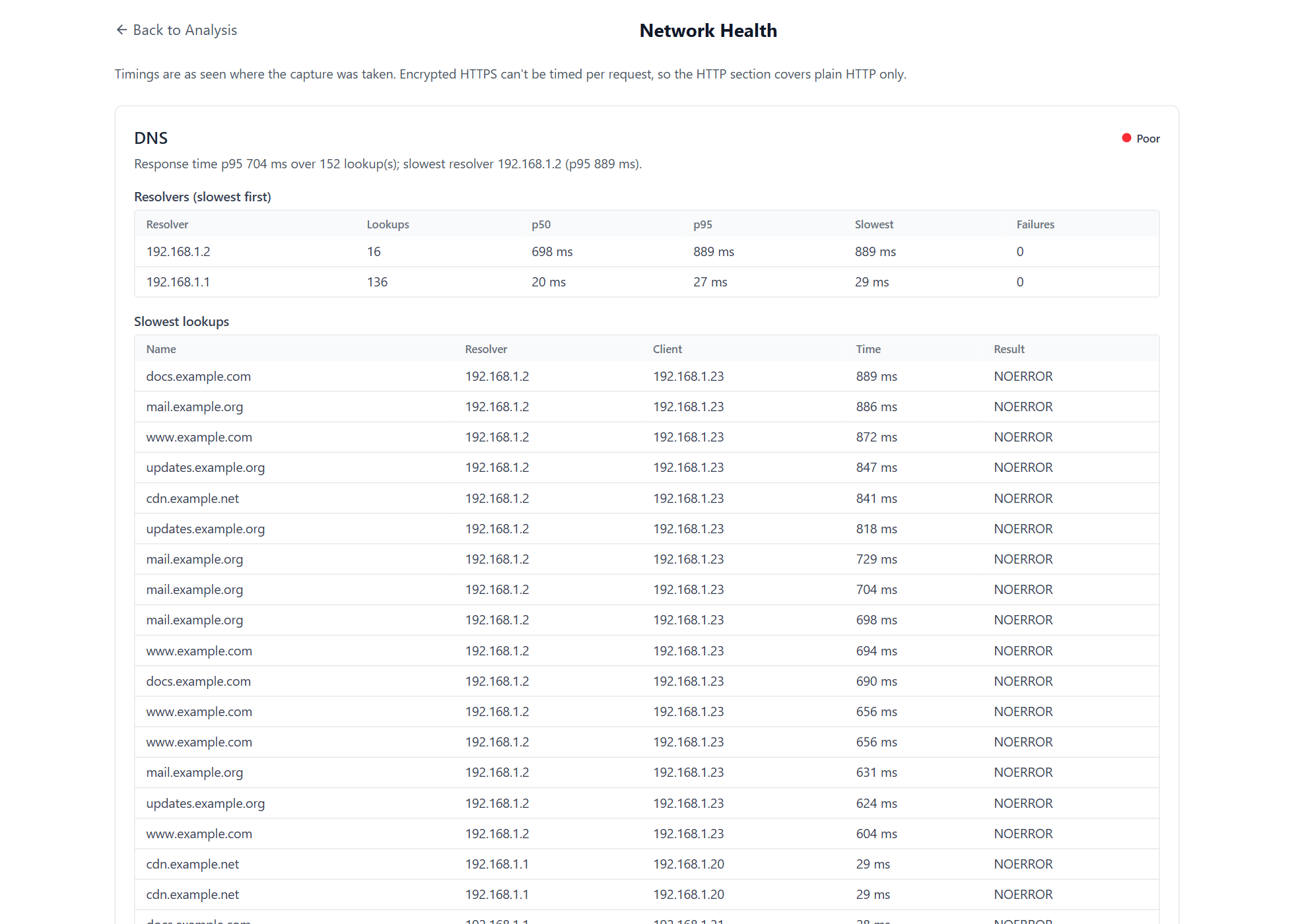
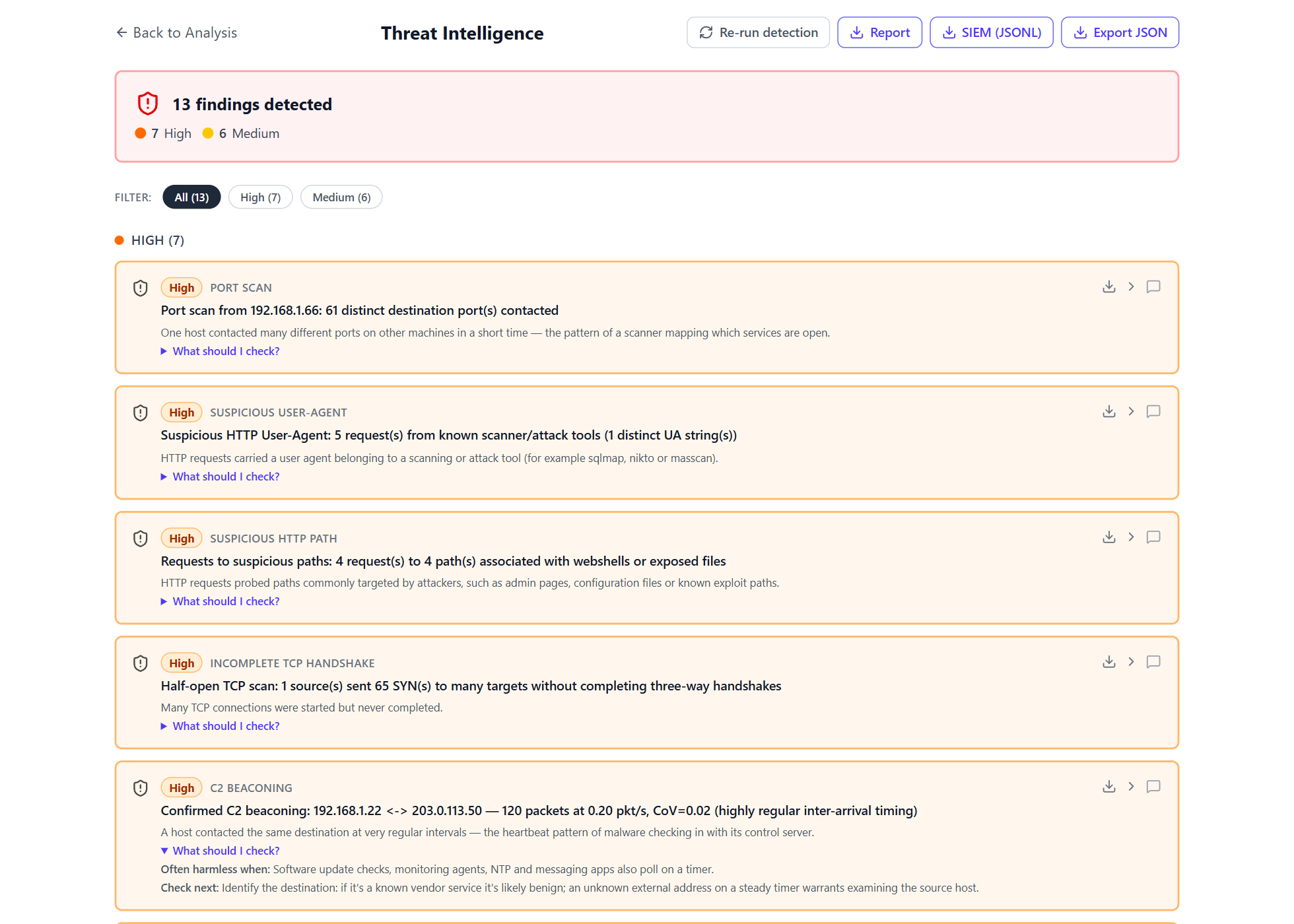
Network health rates DNS, TCP and HTTP as good, warning or poor and names the worst offenders. Every finding now explains itself: what it means, when it's usually harmless and what to check next. Free shows the health summary and a preview of what was found.
History that means something
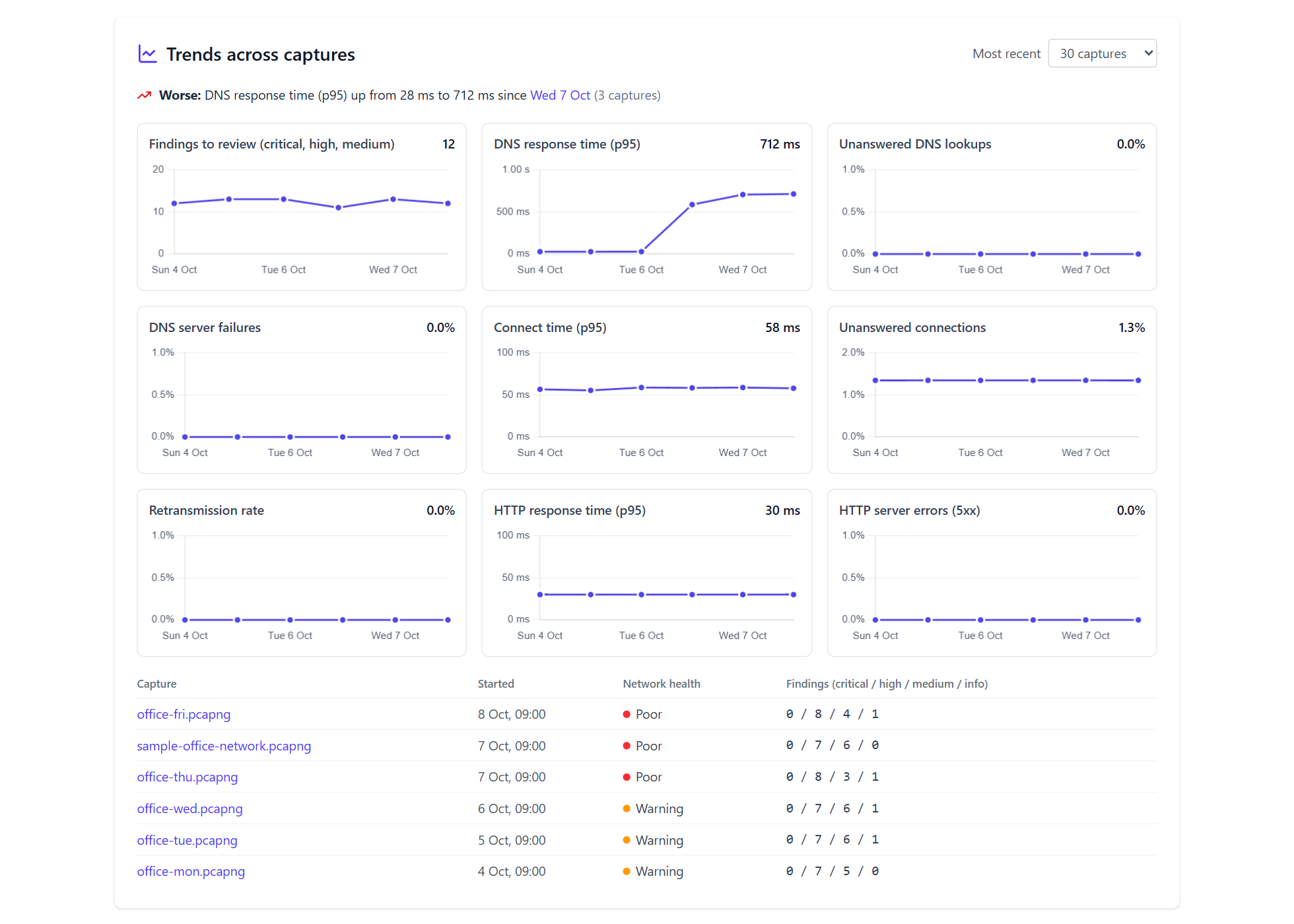
Trends across your captures, “first seen” findings for hosts, domains, certificates and ports your network has never used, and a timeline for any address or domain. Pro.
Deeper decode, on every tier
Follow any TCP or UDP stream. Decode QUIC server names, DHCP, SSH, Kerberos, LDAP, SMB and NTP, see the devices and services found, and fingerprint TLS clients with JA3 and JA4.
Reports you can hand over
Incident reports open with an executive summary and carry your logo, company name and a case reference. You can also make a sanitized copy of a capture to send to a vendor. Pro. See a sample.
Wired into your tools
Local alerts for serious findings, SIEM export as JSON Lines, API tokens for scripts and CI, and threat lists that now take file hashes and JA3, JA4 and HASSH fingerprints. Pro.
Windows-network findings
New detections for cleartext LDAP passwords, SMB1, Kerberos tickets that can be cracked offline, bursts of failed logons and NTP monlist probes, among 44 kinds of finding in all. Pro.
What it does
One Docker container. Runs on a home server, a spare machine, or a £5/month VPS.
Network health at a glance
DNS response times per resolver, TCP connect times, unanswered connections, retransmissions and HTTP server response times, each rated good, warning or poor, with the worst offenders named. Free shows the summary and the worst three of each; Pro shows the full lists and what got worse between two captures.
44 kinds of finding, explained
Port scans, beaconing, DNS tunnelling, cleartext passwords, weak Kerberos tickets, SMB1 and more. Each finding says what it means, when it's usually harmless and what to check next, and you can mark it confirmed or a false positive. Free shows a preview of what was found. Pro.
Trends and “first seen”
Health and findings across your captures over time, such as “DNS response time up from 28 ms to 712 ms since Wednesday”. It also flags hosts, domains, certificates and ports your network has never used before. Click any address to see every capture it appears in. Pro.
Incident reports
One click makes a self-contained report that opens with an executive summary: the verdict, network health, what needs attention and what was checked and found clean. It can carry your company name, logo and a case reference. Pro. See a sample.
Your own threat intel
Import lists of IPs, ranges, domains, file hashes and JA3, JA4 or HASSH fingerprints. Every capture is checked against them: traffic, DNS lookups, TLS and QUIC server names, HTTP hosts and files. Lists are imported locally and never leave your server. Pro.
Follow streams, extract files
Open any TCP or UDP conversation as the text or bytes each side sent, and save the raw data. Pro also lists every file sent or received over HTTP, with its SHA-256 hash, any threat list it's on and a download.
Broad protocol decode
Ethernet, IPv4/IPv6, ARP, TCP, UDP, ICMP, DNS, HTTP and TLS with certificate details. Also QUIC, whose Initial packets it decrypts for server names. Plus DHCP, SSH, Kerberos, LDAP, SMB and NTP, and JA3/JA4 client fingerprints. The devices and services view lists what it found.
Automate it
Drop captures into a watched folder and they're analyzed on arrival. You get local alerts for serious findings, findings for your SIEM as JSON Lines and API tokens for scripts. You can also re-run detection over your whole history. Pro.
Batch, compare and share safely
Analyze up to 20 files at once and diff two captures. With Pro, you can make a shareable copy of a capture for a vendor: payloads stripped, and addresses replaced consistently.
See it in action
Real output from the synthetic office captures that ship with the app - no real network data. Click any screenshot to zoom in.
Free vs Pro, at a glance
Full breakdown on the pricing page.
| Capability | Free | Pro |
|---|---|---|
| Decode, aggregate analysis, follow stream, devices & services | Included | Included |
| Network health | Summary & worst three | Full, plus before/after |
| 44 kinds of finding, with explanations | Preview | Included |
| Trends, first-seen and entity timeline | - | Included |
| Your own IOC lists & history re-scan | - | Included |
| Incident reports with executive summary & branding | - | Included |
| Watched folder, alerts, SIEM export & API tokens | - | Included |
| Upload size cap | 1000 MB | 5120 MB |
| History retention | 25 items | Unlimited |
Straightforward terms, private by design
Clear ownership, direct support and no hidden data collection.
Built and supported by Stuart Mathieson
The product and its technical guides have a named author. Questions go directly to [email protected]. About the project.
No usage telemetry
No analytics, captures or analysis results are sent away. A configured Pro key makes only a license-status check containing no packet data. Read the details.
14-day refund promise
Your first Pro payment is refunded in full if you ask within 14 days, with no questions asked. See the policy.
Ready to try it?
Self-hosting takes about 15 minutes if you already have a server and a domain name pointed at it.